Make sure you can
trust your analytics.

trackmint monitors your tracking and flags every event that breaks.

  • Free event gallery, built automatically with screenshots as you record
  • Free Chrome extension, no code needed
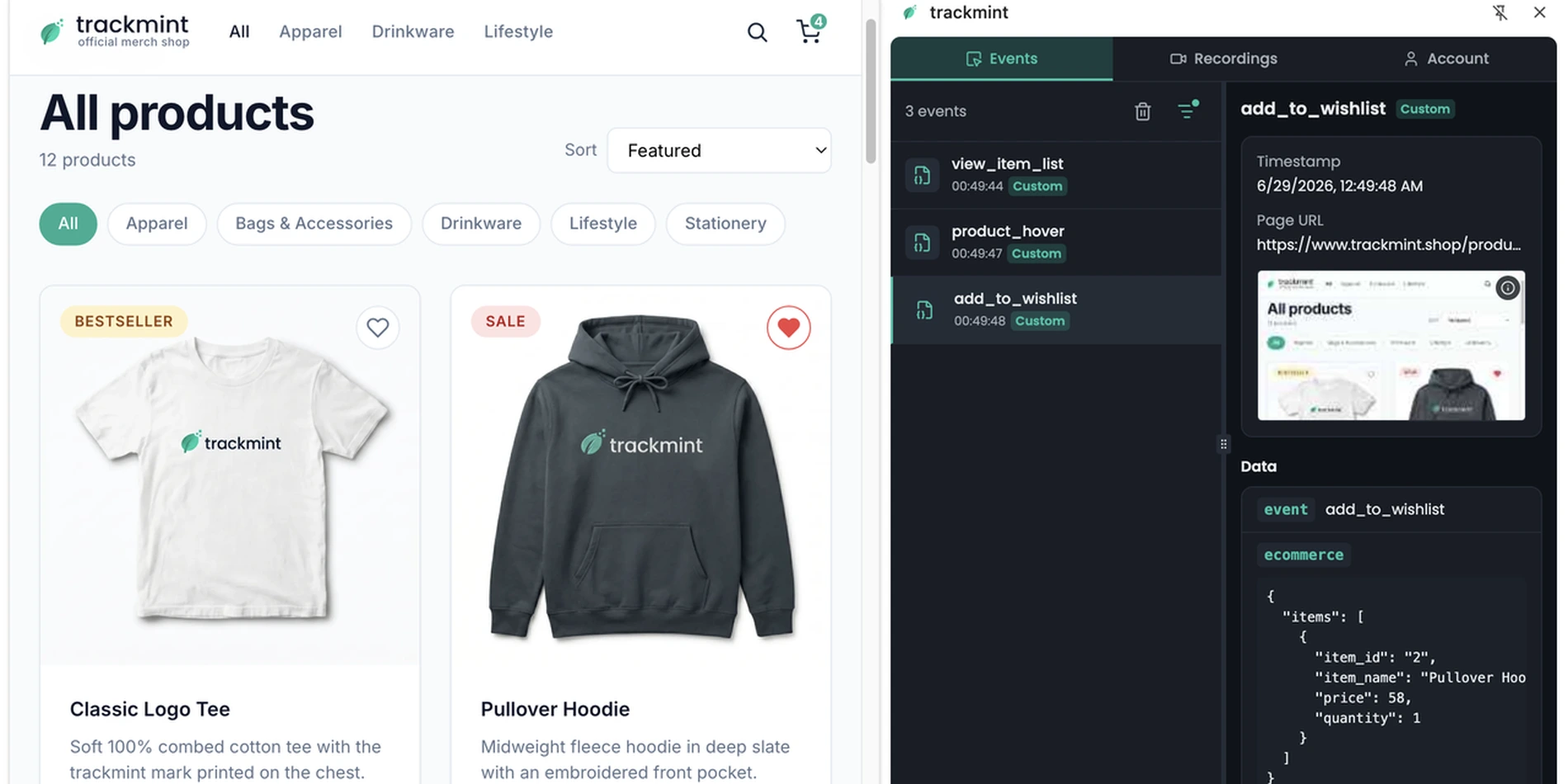
A merch shop with the trackmint side panel open next to it, showing an add_to_wishlist event, its screenshot and its ecommerce data

A website update made every purchase fire twice

  1. Monday 10:15

    Your developers release a new page design.

    The new template loads your tracking code a second time, so the purchase event fires twice on every order.

    Live

    New page design

    Release · Monday 10:15

    your-shop.com/thank-you

    Thank you for your order

    Order #10612 · €93.15

    • purchase sent to Google Ads
    • purchase sent again
  2. Tuesday

    Your shop sold 112 orders, but Google Ads reports 224.

    That makes your campaigns look twice as profitable as they really are.

    Your shop Orders · Tuesday

    Orders
    112
    Sales
    €10,432.80

    Google Ads Conversions · Tuesday

    Conversions
    224
    Cost
    €2,043
    Cost / conv.
    €9.12

    Real cost per order: €18.24

    Illustrative numbers

  3. The next three weeks

    You raise your ad budget.

    Because each sale seems to cost half as much, you go from €2,043 to €3,100 a day, and you still get about 112 orders.

    Weekly report Per day, on average

    WeekAd spendGoogle Ads conversionsShop orders
    Week 1€2,043224112
    Week 2€2,480218109
    Week 3€2,870228114
    Week 4€3,100222111

    €1,057 more a day, for the same orders

    Illustrative numbers

  4. With trackmint: Monday morning

    You find out right after the release.

    trackmint places a test order and sees the sale sent twice, so your developers remove the extra tracking code that morning.

    Start monitoring

    Checkout with a test order

    After the release · Mon 10:31

    1 issue
    1. Home
    2. Product
    3. Add to cart
    4. Checkout
    5. Thank you

    Thank you step compared with the last good run

    • purchase Sent €93.15
    • purchase, again Duplicate €93.15

    Last good run sent it once

What broken tracking costs you

  • Wrong A/B test winners

    An add_to_cart that fires twice can make the losing version look like the winner.

  • Ad budgets steered by wrong data

    Google Ads bids on the conversion values you send it. A purchase that is missing, doubled or sent without its value changes how it bids.

  • Analysts and AI agents working with bad data

    Both report wrong numbers with full confidence.

Your site changes every week. trackmint makes sure your analytics keep up.

How it works, in three steps

Click through a journey once with our browser extension.

demo shop
A customer adds a tee to the cart and checks out while the trackmint extension records the events Recording add_to_cart begin_checkout

Audit of your checkout recording

  • page_view page_location, page_title Delivered
  • view_item items, value, currency Delivered
  • add_to_cart items, value, currency Sent twice
  • begin_checkout items, value, currency Delivered
trackmint replays the journey on the redesigned shop: add_to_cart is sent twice and begin_checkout no longer fires on the popup Checkout Replaying add_to_cart sent twicebegin_checkout didn't fire

Before you install

How is this different from tag scanners?

Tag scanners check which tags load. trackmint follows real user journeys, like adding to cart and checking out, and checks that every click still sends the right events.

How long does setup take?

A few minutes and no code: install the Chrome extension and click through the journey you want to protect.

Which analytics tools are supported?

trackmint picks up events from GA4, gtag, Google Tag Manager data layers, Snowplow and PostHog.

Can I control what gets checked?

Yes, you choose which events and parameters matter, and you can give the replay instructions, for example which product to pick.

Where do I see my recordings?

In the Recordings tab of the extension once you are logged in, and on the web: log in to trackmint with the same account and open Recordings to go through each journey step by step, with its screenshots and events.

Get tracking insurance for every change to your site